Imagine that you're mixing a client's project and there's a section of the song that feels like it needs more going on in it. Let's say you don't have the option of asking the artist to add a track for that purpose. What to do? One solution is to use effects to fill the space. In this free excerpt from the Puremix video "Inside The Mix: Twenty One Pilots with Adam Hawkins" (Puremix Pro Members can watch the full video), Hawkins does precisely that, using a UAD EP-34 Tape Echo plug-in.
POSITIVE FEEDBACK
The excerpt starts with Hawkins working on the chorus vocal. He says he wants to add additional space behind the vocal. He does so by automating movement to the Echo Repeats (feedback) and Echo Pan parameters on the EP-34 that's inserted on the lead vocal track. (The EP-34 looks and sounds a lot like an Echoplex, but for legal reasons, UAD had to give it a generic name.)
When Hawkins plays back the chorus, and you can see the knobs moving on the plug-in. The Repeats parameter moves from about a quarter of the way up to about half-way up.

To add a spatial dimension behind the chorus vocals, Hawkins automated movement in two of the EP-34's parameters (circled) Echo Repeats and Echo Pan.
In the chorus, he starts with the Echo Pan straight up the middle and automates it so that it goes left a small amount, and back to the center several times. At one point he moves it to the right, as well. He says he's creating a "cool sound effect, headphone ear candy."
He reveals the automation data in the track lane for the Echo Repeats parameter, and you can see that although he's following a pattern, it's not totally regular or locked to the beat. He appears to be going for a somewhat random feel, rather than a perfectly quantized one. Hawkins says that for the actual mix he would probably assign each parameter to a fader on his hardware controller and do a "live performance" of the automation.
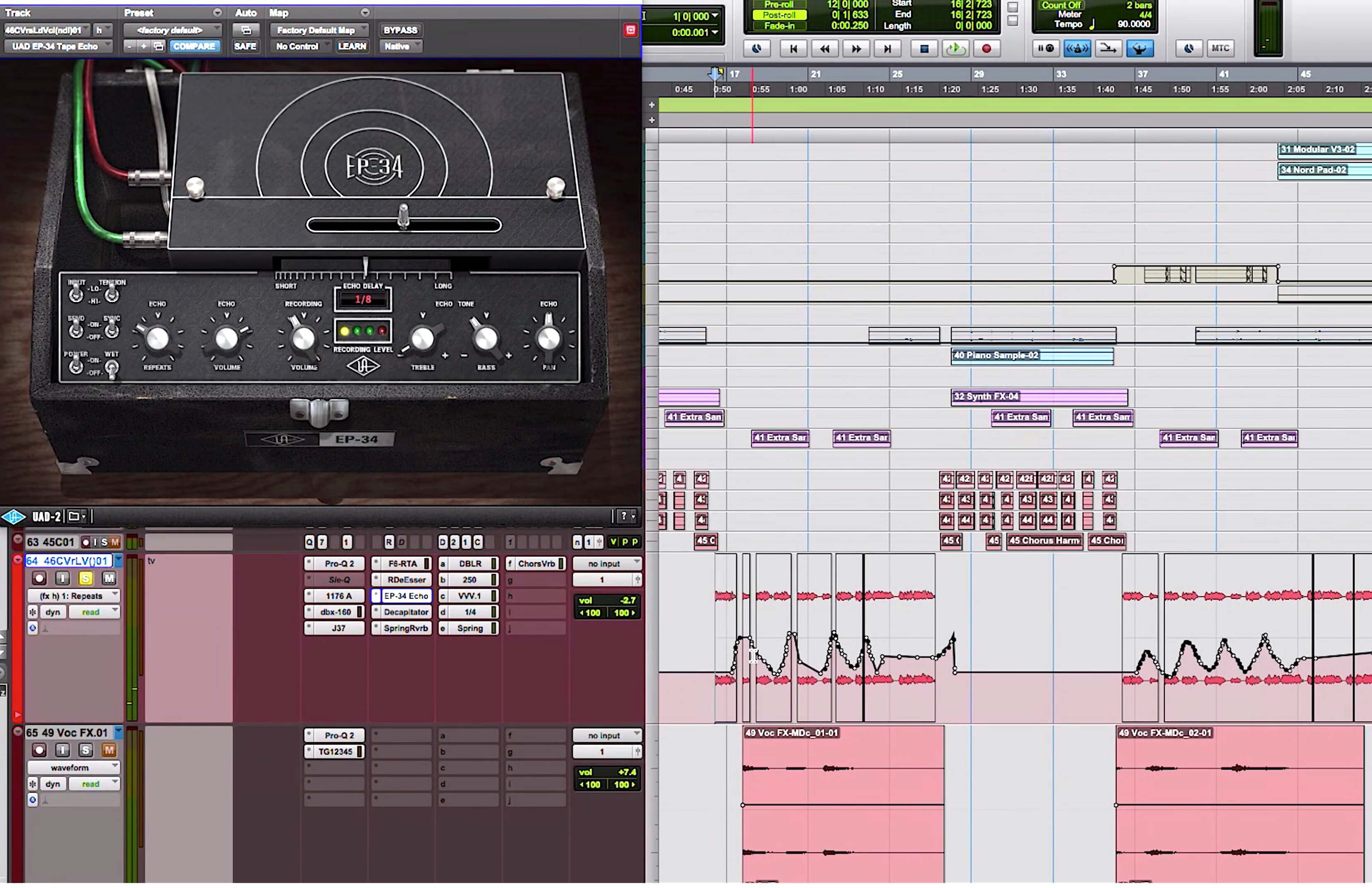
This screenshot from the video shows the automation that Hawkins recorded for the Repeat parameter of the UAD EP-34.
GO FOR IT
In a contemporary DAW, you can automate virtually any plug-in parameter, which gives you a lot of creative options as a mixer. Whether you're filling sonic space, as Hawkins did here, trying to add contrast between sections, or building or reducing the energy, effects automation can be a really useful tool.
In most cases, you'll probably want to be relatively subtle about what you do. An example is how Hawkins automated the pan parameter. He didn't go all the way side to side but just moved it around enough to add some motion.
Let's check out some other examples of effects automation.
Example 1: This also features the same UAD E-34 Tape Delay plug-in, but this time on the lead guitar, which is the focus element in in this instrumental piece. In the first section, the Treble control, which adds or cuts high-end from the echoed signal, is at about 10 o'clock, which is below its midpoint. When the song gets to the next section, which is higher energy, the treble is boosted to about 2 o'clock, making the echoes brighter. Brightness makes a sound stand out more and move forward in the mix, so adding the treble brings more prominence to the echoes.
Example 2: Here's the same song but with the guitar track soloed so you can hear the change more clearly. (Note: in this example and Example 3, you'll only hear the music from four bars before the section change, rather than eight bars before as in Example 1.)
GETTING MORE INTERESTING
Another cool way to use a delay is to put it on a percussive part and sync it to the song's tempo. Then you can use the delay to add additional rhythmic complexity.
Example 3: This is a soloed version of part of the conga track from Example 1. It's pretty simple in the first section, but gets more involved in the second part, thanks to a digital delay—more specifically a McDSP EC300. Listening soloed like this, you can tell that the extra hits are from a delay, but when mixed in with the other tracks, it doesn’t sound like an effect.
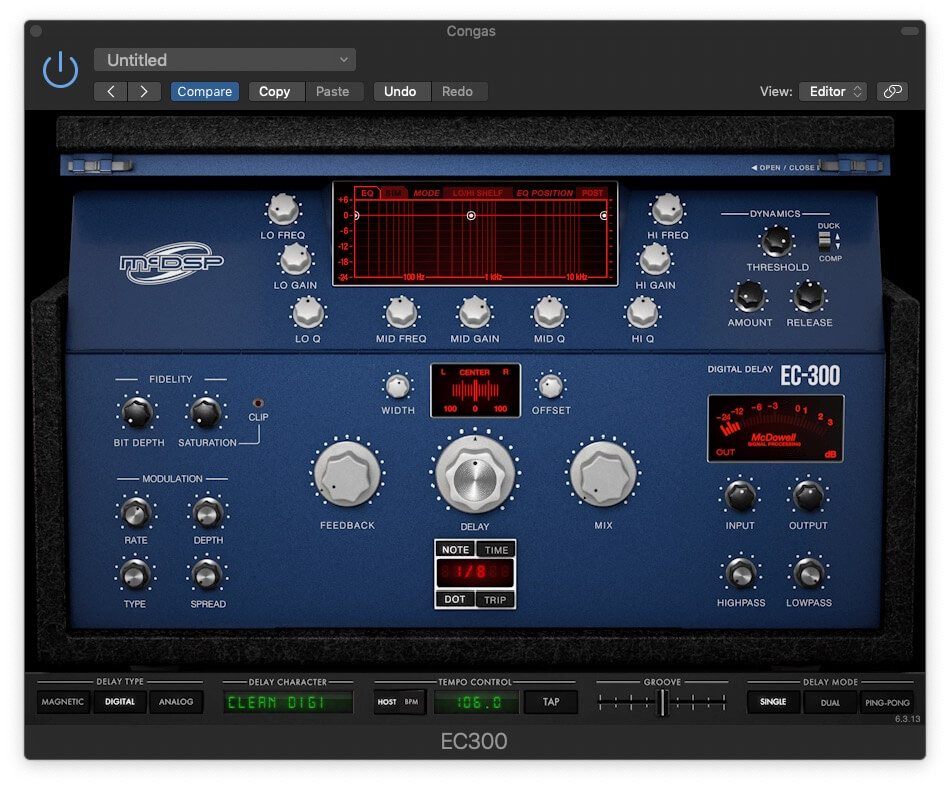
The McDSP EC300 is a versatile delay plug-in that offers digital, analog and tape modes. Because of its clean reproduction, digital mode was used in Example 3 to make the conga part sound more complex in the chorus section of the song.
The EC300 was chosen in this case because it has a clean digital mode whose taps are sonically the same as the original. The idea of this technique is to use the rhythmic delay to make it sound like the musician is playing a more involved part. A tape delay like the EP-34, like other tape or analog delays—features delays taps that have lower fidelity than the original and sound more obviously like delays, so it wasn't as good a choice for this application.
To find the right setting when applying this technique, you not only have to find a delay time setting that works rhythmically, but also experiment with the mix and feedback settings to get the most realistic balance of original and delayed signal that you can.
REPEAT AND FADE
When it comes to automating your effects, your options are wide open. There's one important caveat to keep in mind: As a mixer, your role is not to draw attention to yourself and your techniques. Everything you do should be in service of the song and the artist's vision for it.
