Shaping Jazz Piano with the FATSO Jr.
Fab Dupont
Minimalist Processing for an Authentic Jazz Sound
Why Jazz Mixing Requires Subtlety
Mixing jazz typically require a more minimalist approach to processing than rock, pop, hip-hop or electronic dance music. In this excerpt from “Mixing Jazz With Fab Dupont,” we see Fab processing the piano from a jazz-trio recording. For this mix, he’s using strictly analog outboard processors to keep the recording sounding as natural as possible.
Fab’s Analog Routing Setup
He’s got a rack of processors, which he controls with an analog router from Dangerous Music called the Liaison. For the piano track, he uses it to insert an Empirical Labs FATSO Jr.
Exploring the FATSO Jr.'s Role on Piano
GETTING FAT
What the FATSO Jr. Actually Does
The FATSO Jr. is an analog tape simulator and compressor. Fab is using it here to control the dynamic range of the piano and add a little warmth. There’s actually a circuit in the FATSO Jr. called Warmth, which is a high-frequency limiter. It was designed to emulate the high-end attenuation that you get when you record to analog tape. You can turn the effect on and off, and you get seven different intensity levels to choose from.
Inside the Processing Rack

At the top of Fab’s rack is the Dangerous Liaison router, and below you see the Empirical Labs FATSO Jr. and a Manley Stereo Pultec EQP-1A.
Before and After: Listening to Dynamics Control
He plays a section of the piano track back, first without and then with the FATSO Jr. In the example, the pianist is hitting some syncopated block chords, and the brightness and level jump out a little on the higher ones. With the FATSO Jr. in, not only are the dynamics more even, but the highs have been tamed a bit by the Warmth circuit in the processor.
Softened Transients and Natural Compression
He plays back the same section again, without and with the processing, asking the viewers to carefully pay attention to the differences. While it’s a subtle effect, he observes, the transients have been softened a bit, and the sound is more compact—or controlled—sounding. Because this type of jazz is supposed to sound as natural as possible, he’s going for a transparent sound and doesn’t want any noticeable compression artifacts like pumping.
Managing Drum Bleed in a Jazz Trio
You’ll notice that you hear some fairly significant drum bleed on the piano track. That’s because, to capture the natural sound of a jazz trio, the recording was made with the musicians all in the same room, without any separation, so they could see and hear each other as if they were playing a live show.
The upside of such an approach is that the musicians feel more comfortable and in their element than if each one was in a separate iso booth. The downside is that there’s bleed on all the tracks, which means that when applying EQ, compression or any processing to the track, it also impacts the instrument that’s bleeding, to some extent. That’s another reason for subtlety with settings. The piano mics actually have the least amount of bleed, because they were inside a grand piano, so are somewhat more isolated from the drums and bass.
Working With the Hardware and Plug-In Versions
The UAD FATSO Jr. Plug-In
UAD makes a plug-in version of the FATSO Jr. that does an excellent job of emulating its various circuits. Both the hardware unit and the plug-in offer three different processing sections: Compressor, Warmth, and Tranny.
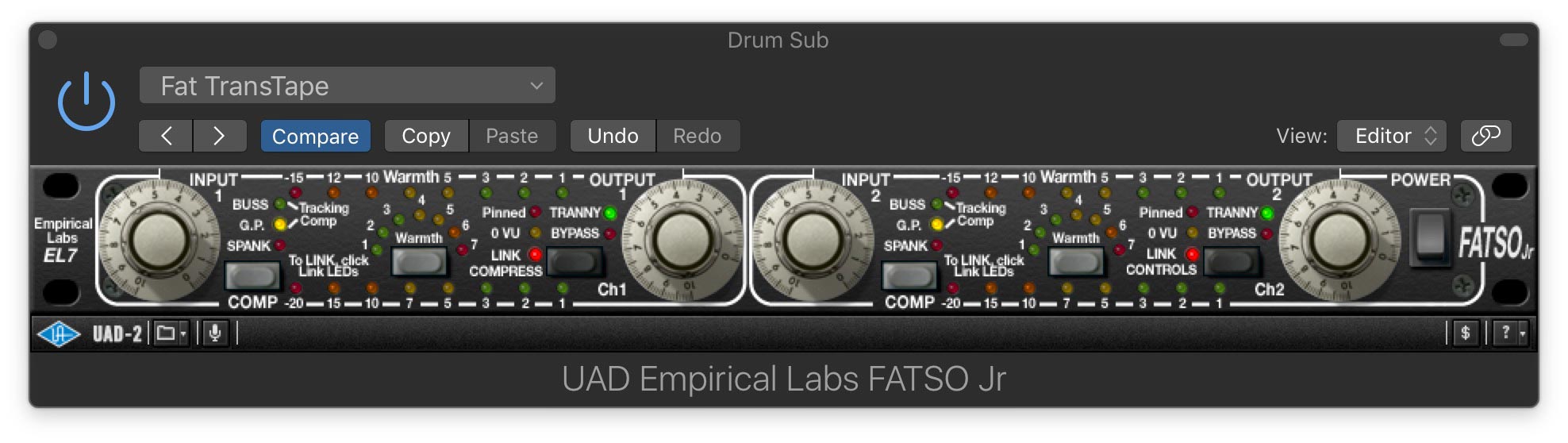
The UAD Empirical Labs FATSO Jr. plug-in is an accurate software emulation of the original hardware.
Four Compressor Modes, One Input-Driven Workflow
You don’t get just one type of compressor, but four different ones: Buss, G.P. (General Purpose), Tracking and Spank. These can be turned on singly or together. They all have fixed ratio, attack and release settings. There’s no threshold control; instead, you set the amount of compression based on how hard you hit the input.
The Buss compressor is the one Fab used on the piano. It’s got a low 2:1 ratio, a slow attack, a fast release and a soft knee. It’s designed for transparent, gentle compression. G.P. offers a medium attack and slow release and is also pretty transparent. Tracking provides 1176-style compression, and Spank is super aggressive.
The Tranny Circuit and Low-End Harmonics
The other component of FATSO Jr.’s tape emulation effect is called the Tranny Processor. It emulates the transformers on some analog hardware devices and adds harmonics below 150Hz in a way that helps bass frequencies cut through a mix better. It also adds a little edge to the midrange.
Audio Examples and Practical Listening
Using Exercise Files to Study the Processing
The following examples were made using the Exercise files from the video “Mixing Jazz With Fab Dupont.” If you’re a Puremix Pro member, you can download the files and try the same techniques (or any others you want to experiment with) on that same piano track. The example files also include the bass and drum tracks so you can mix the entire session.
Piano Examples: Warmth and Subtle Control
The first pair of examples use the piano tracks. There are four of them: high and low with a vintage AKG C60 tube mic, and low and high with a Røde SM2. For these examples, they’re bussed to a single stereo bus.
The first two examples feature the piano bus in solo mode during a section of the piano solo. The pianist is playing a single note line with his right hand that goes up pretty high, and some chordal stabs with his left hand. It will give you another chance to hear the FATSO Jr.’s Warmth circuit, which kicks in more on the higher notes. Like in Fab’s example in the video excerpt, the Buss compressor is on.
Example 1: Piano with no processing.
Example 2: Piano with processing.
Bass Examples: Compression and Low-End Weight
Next, let’s apply FATSO Jr. on the bass. Here’s a short section of the bass track, recorded with a Neumann U47 tube mic and an AKG C12. Again, the FATSO Jr. is used but with different settings. It’s compressing the bass a little, and the Tranny circuit is on to add some low-end sweetening.
Example 3: Bass without processing.
Example 4: Bass with processing.
Recreating the FATSO Effect with Alternative Plug-Ins
Why the FATSO Jr. Is Hard to Replace
FATSO Jr.’s blend of effects and proprietary circuitry makes it a unique processor, whether for jazz or any kind of music. That said, if you don’t have the hardware or plug-in version, you could approximate it to some degree using a couple of individual plug-ins.
Building a DIY FATSO Chain
To approximate the tape simulation that you get in the Warmth and Tranny circuits of FATSO Jr., you could use a tape plug-in along with a versatile compressor that can give you different flavors the way the one in FATSO Jr. does. For example, the Waves Abbey Road J-37 for the tape simulation and Fab Filter C-2 for the compression. You won’t exactly emulate FATSO Jr., but you can get a similar result.
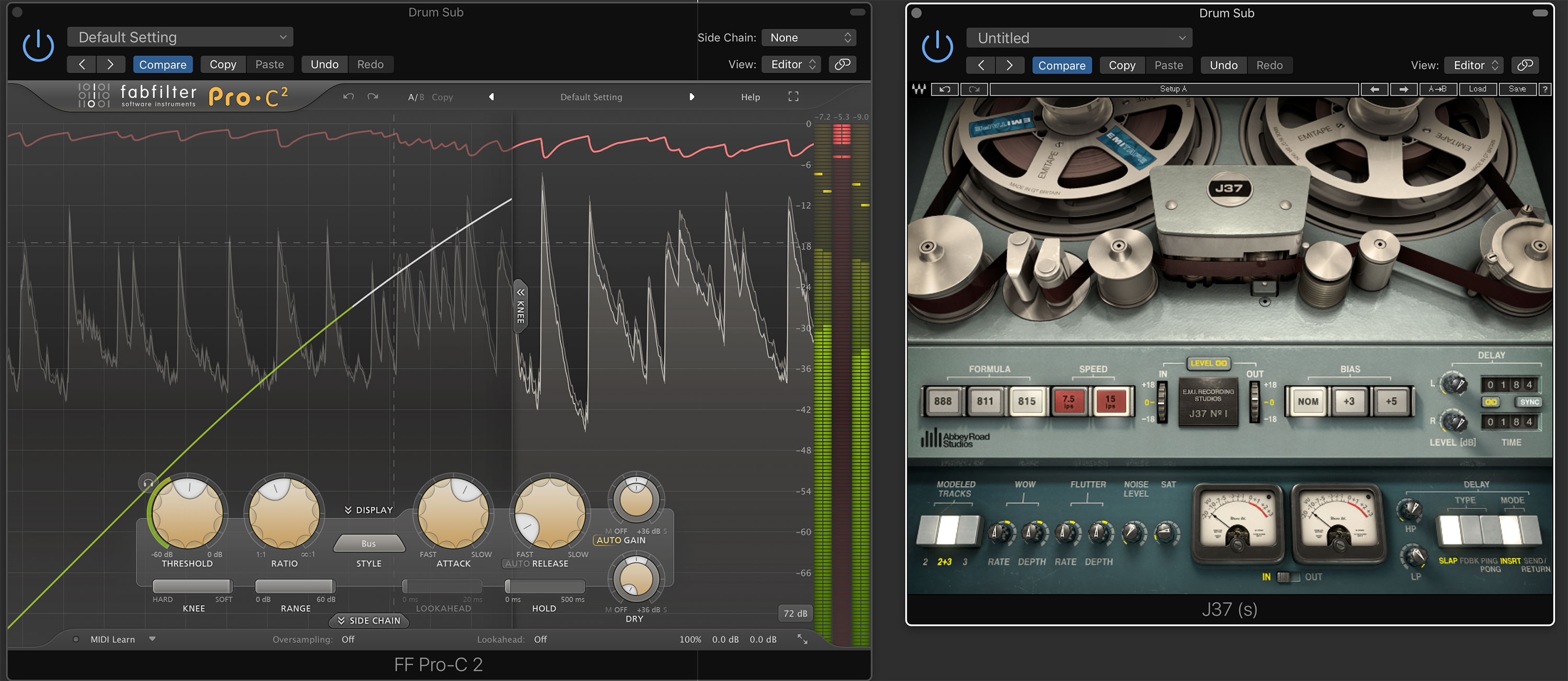
The Waves Abbey Road J-37 and Fab Filter C-2
Here are three examples, from a short section of the drum track during the drum solo:
Example: 5: Drums with no processing.
Example 6: Drums with FATSO Jr., with Bus compression on with the input about 6.5, Warmth at 6 and the Tranny circuit on.
Example 7: Drums with Waves J-37 on a moderate setting and Fab Filter Pro C-2 on its Buss setting with a 2:1 ratio, slow attack and fast release, similar to the Buss setting on FATSO Jr.
Again, the differences are subtle, but on examples 6 and 7, the toms feel a little more contained by the compression and the the transients are a little softer and more tape-like than on the unprocessed drums (ex 5).
