EQing Upright Bass In A Jazz Mix With Fab Dupont
Mixing Jazz With Fab Dupont
Upright bass in this week’s excerpt
In this week's excerpt from the video, “Mixing Jazz With Fab Dupont,” Fab is EQing the upright bass.
A well-recorded upright that only needs sweetening
The upright can sometimes be a tricky instrument to mix, but because this bass was played and recorded so well, Fab is mainly just using EQ to further sweeten it.
Little Tweak
Trying the Lil Freq first
After trying an Empirical Labs Lil Freq (not shown in the excerpt), he concludes it's not the right processor for this particular bass track and decides to try another.
Switching to the Chandler LTD-1
He reaches over to the patch bay and inserts a Chandler LTD-1 on the bass channel. The LTD-1 is an EQ and a mic preamp, and is designed to sound and perform like the highly regarded Neve 1073 module.

Fab uses the Chandler LTD-1 to EQ the upright bass
Starting with a 50 Hz high-pass filter
He starts with a high-pass filter set at 50Hz, which is a little lower than the 60Hz frequency he used on the Lil Freq. He plays a short section, and likes how it sounds. Note that he's listening to the entire mix, and not just the bass track, so he's doing his EQing in context of the other instruments. He observes that the eighth-note run in the section he's playing back sounds cleaner with the filtering.
Why high-pass filtering the bass helps
The reason he's using a high-pass filter is to get rid of unneeded low-end that can muddy up the track. A high-pass filter rolls off the audio below its center frequency. Most high-pass filters let you adjust the steepness of the roll-off, but the LTD-1 has a fixed, 18dB-per-octave slope. If you're high-passing a bass, you have to be careful not to set the frequency too high, or you'll take out too much of the meat of the sound. But with it set to 50Hz, that's not an issue.
Gaining Weight
Boosting 220 Hz for thickness
Next, Fab wants to fatten the sound up a bit. He observes that like on a 1073, the Chandler's 220Hz band is pretty "fat" sounding. He boosts the signal a little at that frequency. After playback, he observes that it's thicker without accentuating any low resonance.
Adding ‘rubbery’ tone around 300 Hz
He next wants to push the "rubbery" sound of the bass, which he does by boosting a couple of dB at 300Hz. He says he's beginning to really like the results. He observes that a lot of the sonic improvement may be coming from the LTD-1's transformers (which add a pleasant coloration to the sound) and not just from the settings he's dialing in.
Checking focus and how the bass anchors the mix
He plays the section back again and suggests listening to the focus—where the sound is centered frequency-wise—and if any frequencies are sticking out too much. He also says to listen to how well the bass is anchoring the low end of the mix. (Because this is jazz, the bass holds down the bottom end of the mix because it's much more of a consistent presence than the kick, which, unlike in pop music, is used more for accenting the beat, and plays more sporadically.)
Accentuating finger attack at 5kHz
He decides to "get more fingers" into the sound, by which he means accentuating more of the high-end from the bassist's right hand plucking the strings. To do so, he sets up a 2dB boost at 5kHz using the high-shelf filter on the LTD-1. He likes it. A high-shelf filter boosts at a particular frequency and then remains boosted throughout.
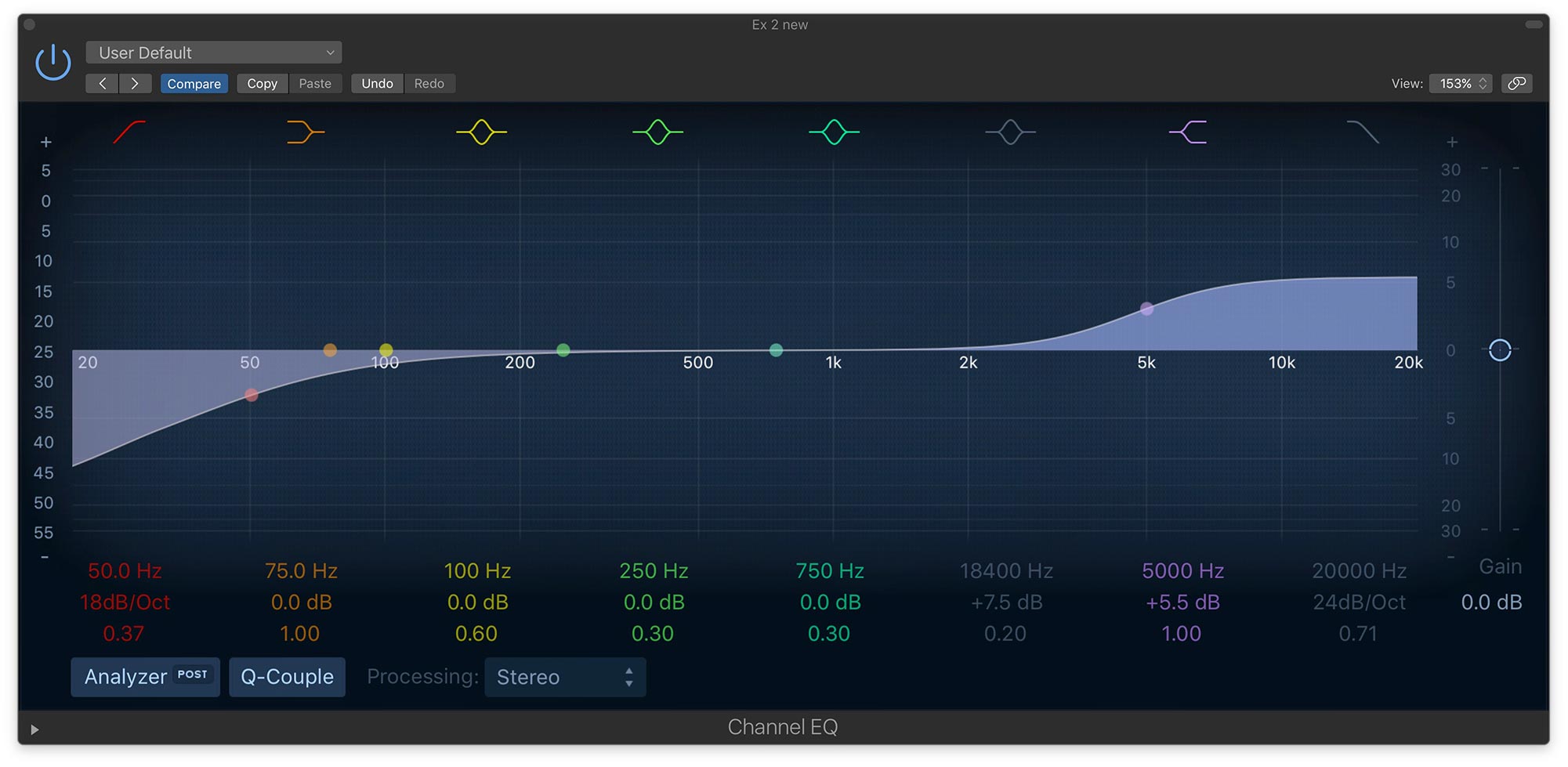
This screenshot shows the shape of a high-pass filter (left) and a high-shelf filter (right)
Now he suggests listening for the finger sounds and plays the passage back with and without that filter in. He says it's got a "tiny bit of a shine," now, which he likes.
Why no compression is needed
He points out that he's not compressing the bass, and that it's not necessary because the bassist's dynamics are consistent. In other words, the volume level from note to note was pretty even—none of the notes were jumping out too much or were too quiet. Because the bass mics were a little bit back from the instrument itself, he says that the air compressed it somewhat. By air, he's referring to the distance the sound waves had to travel through the air from the bass before reaching the mics.
Fab’s overall EQ strategy
He says that his strategy for EQing the bass was to enhance the desirable frequencies, thus making the problem frequencies stand out less, and improving the overall sound.
Download the multitracks and try it yourself
(If you're a Puremix Pro Member, you can download the individual track files from this session and experiment with EQing the bass, drums or piano, or even try doing a full mix of the song.)
Upright Rescue
When the upright bass track needs more work
The upright bass in Fab's video was excellently played on a quality instrument by a top-notch bassist, and well-recorded into high-level pro gear. The result was a track that didn't need much corrective processing. It's worth noting that it isn't always the case. The upright can be tough to record well, and you might end up in a situation where you have to mix one whose sound needs a lot of work.
Why upright bass can be difficult to record
One reason they can be problematic is they have so much bottom end and not all that much in the high frequencies, especially compared to an electric bass. You can try EQ to bring out more highs, but that doesn't always work that well.
Using multiband compression to control boominess
If you have a multiband compressor on hand, you can also try shaping the bass sound by compressing the lower part only, which can make it sound more contained, and then using the gain controls for the upper mids and highs to boost those areas.
Setting up three frequency zones
Here's one way to do it: Create three frequency zones on your multiband compressor. One for the low part of the bass, maybe below about 150 or 175Hz, another above that going up to about 1.2 or 1.3kHz, and a third one above that. You then set the lowest zone to compress enough that you attenuate some of the boominess. Experiment with the ratio and threshold to see what sounds best. You might want to compress only notes that are particularly loud, or compress everything evenly. Then, go up to the highest zone and boost with its gain control. You can also try a very slight attenuation of the middle zone, or possibly a boost, and see if that helps or hurts the sound.
Enhancing attack with a multiband transient shaper
You can tweak the sound even more with an EQ, and if you have a multiband transient shaper, it can be perfect for adding more attack in the upper registers, which effectively adds more high-end to the sound. Set three zones with similar frequency settings as you did on the compressor. Then boost the attack in the upper zone, and you should hear the high end of the bass pop out more. Experiment with reducing the attack in the low zone.
Example: before and after multiband processing
Let's check out an example.
Example 1: round-sounding upright bass
Example 1: An upright that's a little too round sounding and lacking in the high-end finger sounds.
Example 2: upright bass processed with Neutron 2
Example 2: The same part with iZotope Neutron 2 applied.
It's a modular channel strip plug-in that has both multiband compresser and multiband transient shaper among its modules. Here, the multiband compressor and transient shaper modules are utilized, with settings similar to those just described. Notice that it's less boomy and has more upper mids and highs coming through.
Transient shaper settings screenshot

Here's the transient shaper in iZotope Neutron, set for Example 2.
Parallel Processing For Sampled Upright
Adding life with parallel saturation and compression
Another situation you might run into is a sampled upright bass that's lacking life. Something to try is parallel processing, with both heavy compression and a little distortion or saturation on the parallel track. You then just ease it into the mix at a lower level, alongside the regular bass sound. The combination of the two can sound more full and energetic.
Example 3: parallel-processed sampled upright bass
Example 3: The first four measures are a sampled upright and a drum kit.
In the second four measures, a parallel bass track is added in at lower volume, with Soundtoys Decapitator and the UAD Urei 1176 Rev LE on it, providing some distortion and heavy compression. You'll hear how the bass sound fills out when combined with the parallel-processed track.
1176 and Decapitator settings

Here are the settings of the 1176 and Decapitator for Example 3.
